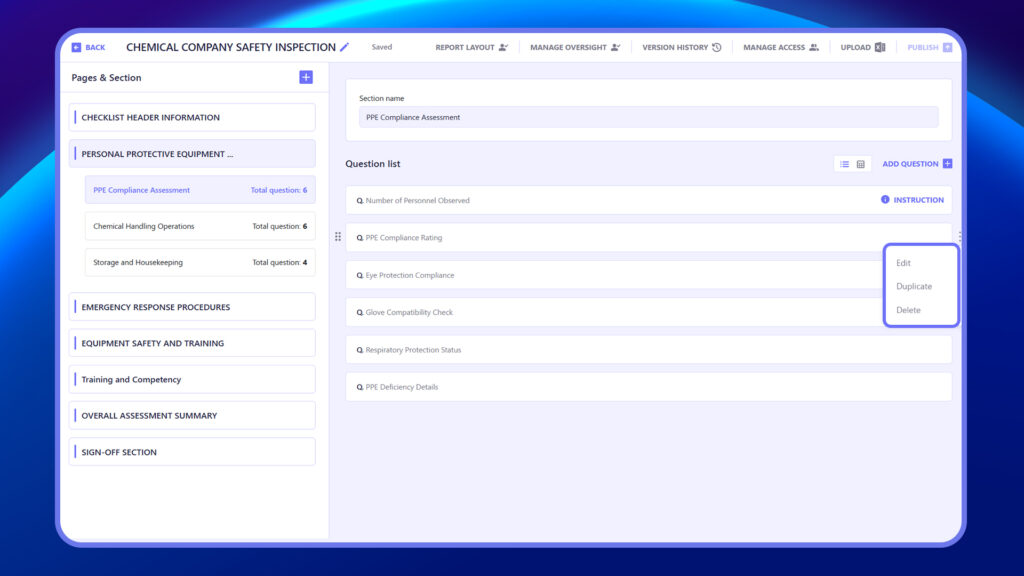
Edit Question
Use the Edit Question option to modify the question title, answer type, instructions, logic, or any attachments. This helps you update the question without needing to recreate it.
Steps to Edit a Question
- Click the three-dot icon (⋮) next to the question.
- Select the Edit option from the dropdown menu.
- Update the Question Title, Answer Type, Instructions, Logic, or Attachments as needed.
- Click Save to apply the changes.
Delete Question
Select Delete Question to remove a question from the checklist permanently. Use this if the question is no longer relevant. (Note: Deleted questions cannot be recovered.)
Steps to Delete a Question
- Click the three-dot icon (⋮) next to the question.
- Select the Delete option from the dropdown menu.
- Confirm the deletion when prompted.
- The question will be permanently removed and cannot be recovered.
Duplicate Question
Click Duplicate Question to create a copy of an existing question. This is useful when adding similar questions without re-entering all the details manually.
- Click the three-dot icon (⋮) next to the question.
- Select Duplicate Question.
- A copy of the question will appear below, which you can edit as needed.
- Make any changes and click Save.