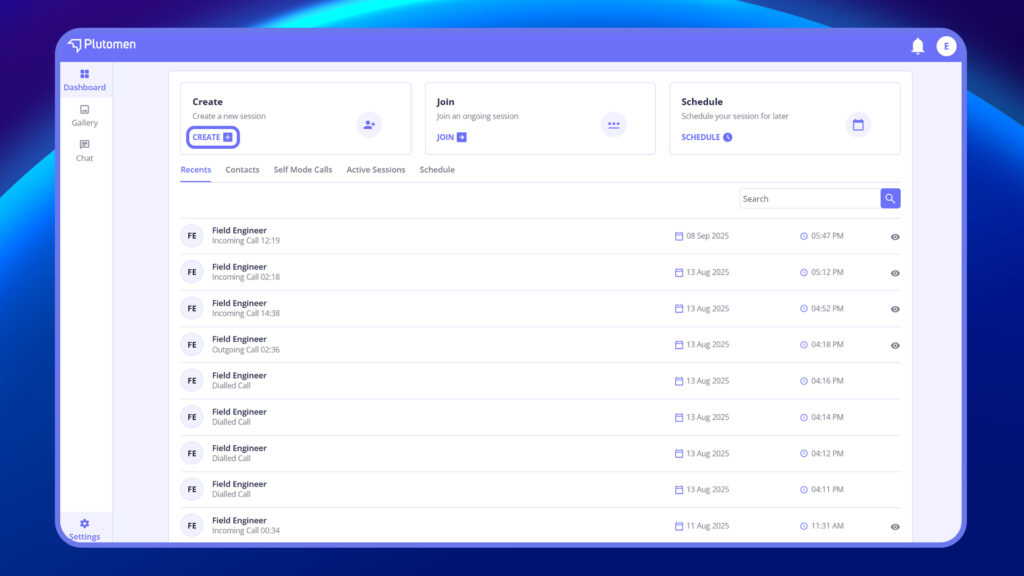
Follow these steps to start a live session:
- Tap + Create on the Dashboard. This will initiate the creation of a new session.
2. View the Session Setup Page
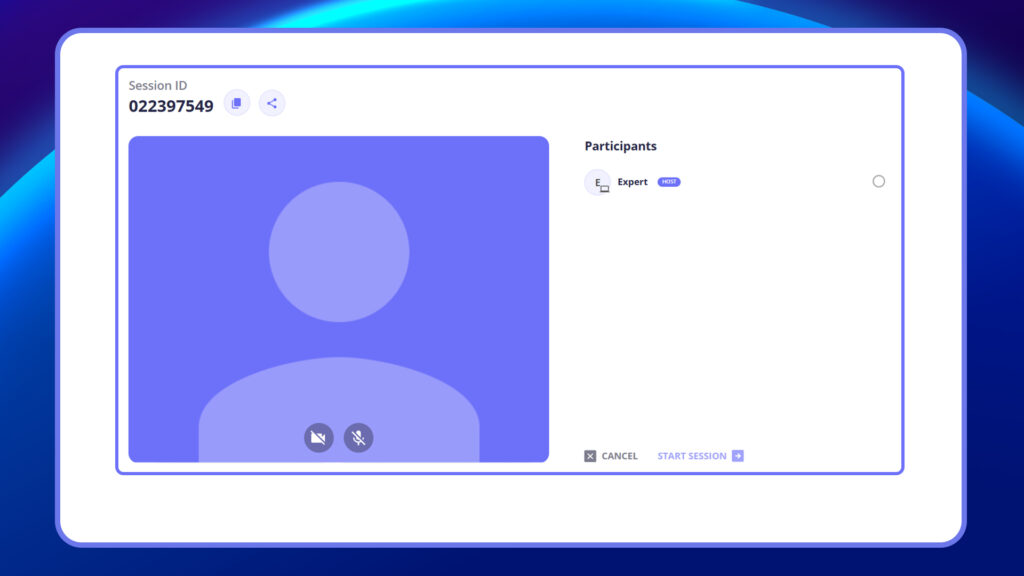
After tapping Create, you’ll be redirected to a screen displaying:
- Session ID (auto-generated)
- Option to copy the session ID or share it as a clickable link
3. Host is Automatically Assigned
The user who initiates the session becomes the host. Their name appears with the host label in the session.
4. Wait for Participants to Join
While waiting, users can:
- Toggle the microphone and camera on or off
- See the host in the waiting room
6. Participant Details Appear as They Join
As others enter the session using the ID, you’ll see:
- Their name
- The device they’re using
7. Assign a Presenter (Host Only)
Once multiple participants have joined, the host can:
- Select any one mobile user as the presenter
8. Start the Session
After selecting a presenter, the Start Session button becomes active for the host. Tap to begin the session for everyone.
Insert Video: How to create and share a live session
Notes
- Web users cannot be presenters.
- Both host and presenter must be using mobile devices.
- Only the host can assign the presenter.
- A presenter must be selected before the session starts – it cannot be changed mid-session.
- If the host leaves the session setup screen, they can rejoin within 30 minutes from the Active Session page.


