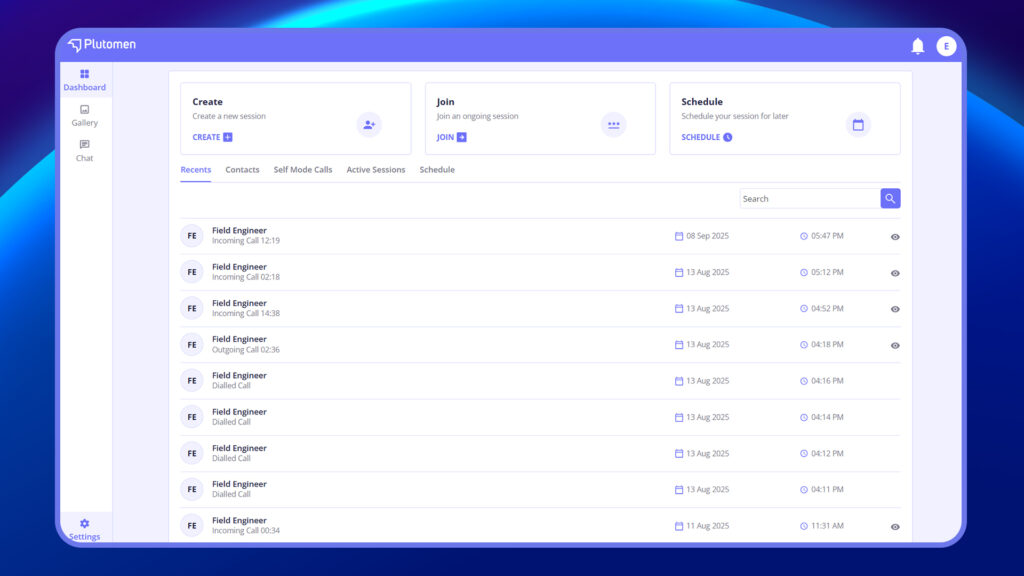
Once the expert logs in to Plutomen Connect Web, they are directed to the Home Page.
The Home Page is designed with a clean and intuitive interface, allowing experts to quickly access key functions. From here, experts can:
- Create a Session – Start a new support session for a frontline user.
- Join – Enter an ongoing session using a session code.
- Schedule a Session – Set up future sessions in advance.
- Access Recent Calls – Quickly revisit past sessions for continuity.
- Use Phone Book (Contacts) – Connect instantly with saved contacts.
- Self-Mode Calls – Test and experience the session flow by calling yourself.
- View Active Sessions – Monitor and manage live ongoing sessions.
- Manage Scheduling – Organize planned sessions efficiently.