Overview #
Tags are used to label and categorize data across the platform for quick identification and filtering.
Using tags helps users easily search, filter, and organize information without relying only on categories or hierarchy.
Where to Access Tags #
Go to Settings → Tags.
👉 Tags are managed under the Organization section in Settings.
How to Create a New Tag #
Step 1: Access Tags
Go to Settings → Tags.
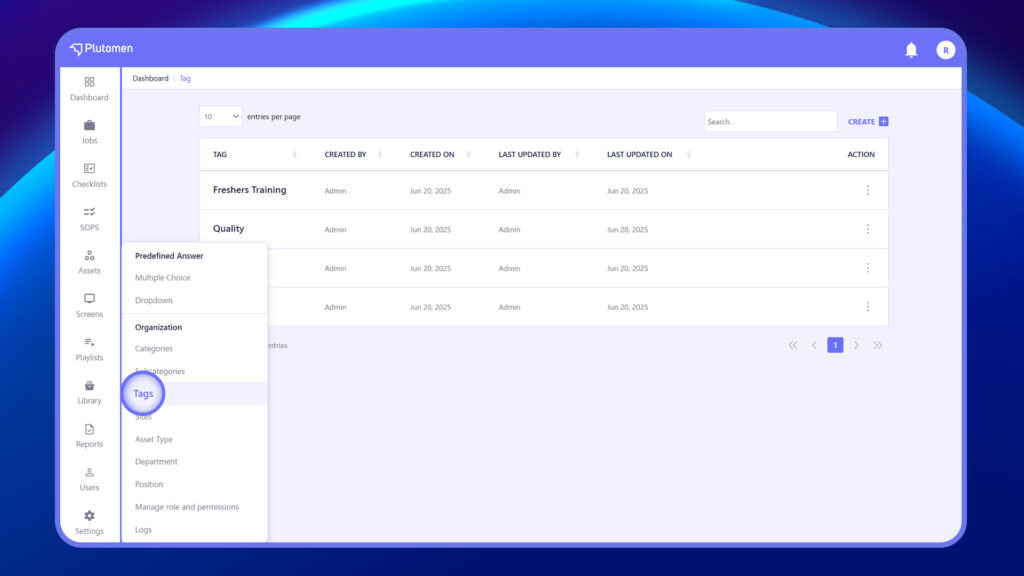
Step 2: Create Tag
Click Create
Step 3: Enter Tag Name
Provide a relevant Tag Name
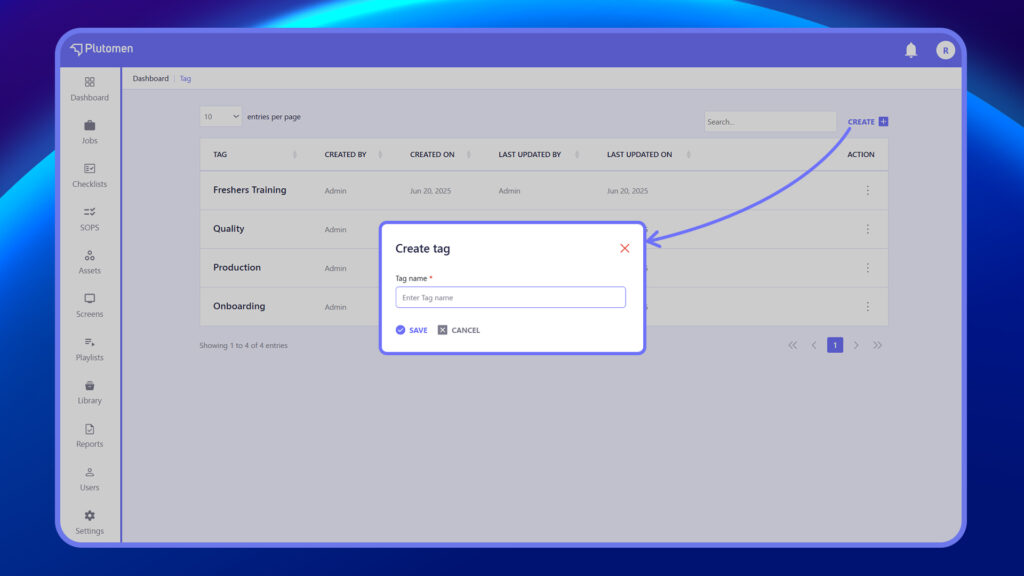
Step 4: Save Tag
Click Save
👉 Use short, clear, and meaningful tag names for better usability.
How to Edit an Existing Tag #
Step 1: Open Tags
Go to Settings → Tags.
Step 2: Select Tag
Choose the tag you want to update.
Step 3: Click Edit
Use the three dots (⋮) menu and select “Edit.”
Step 4: Update Tag Name
Modify the tag name as required.
Step 5: Save Changes
Click Save


