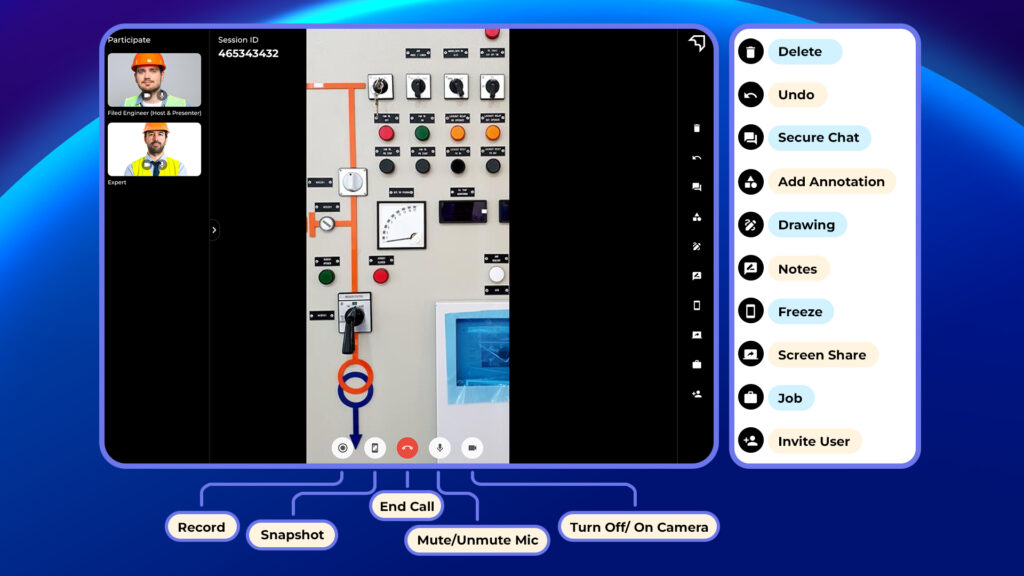
Once the expert and technician are on the call and have a live view of the site or machine from the technician’s camera, communication tools play a crucial role in facilitating effective remote support.
- Undo: Revert the last drawing or action performed during the call.
- Chat: Communicate via text messages during the call.
- Annotations: Add predefined annotations (e.g., arrows, highlights, shapes, labels) to emphasize key areas on the screen.
- Draw: Draw and mark any areas on the screen using freehand tools.
- Snapshot: Capture screenshots of the current screen view.
- Notes: Create and save notes during the session.
- Screen Share: Share your screen with other participants.
- Invite User: Send an invite to add participants to the ongoing call.
- Recording: Record video and audio of the session.
- Freeze: Freeze the screen to pause any changes for focus or discussion.
- Mute: Mute/unmute your microphone.
- Video Camera: Turn your video on/off during the call.
- End Session: Terminate the ongoing call for all participants.