When creating a new SOP, start by filling in the SOP Details section. This includes specifying the SOP Name, which is a required field and helps identify the procedure—for example, Untitled 1 can be renamed to a meaningful title later. Next, select the appropriate Category from the dropdown list to classify the SOP by its function or department. If available, choose a Subcategory to further narrow down its classification. Proper categorization ensures the SOP is easy to find, manage, and assign.
Steps to Fill SOP Details
- Start by entering the SOP Name (required).
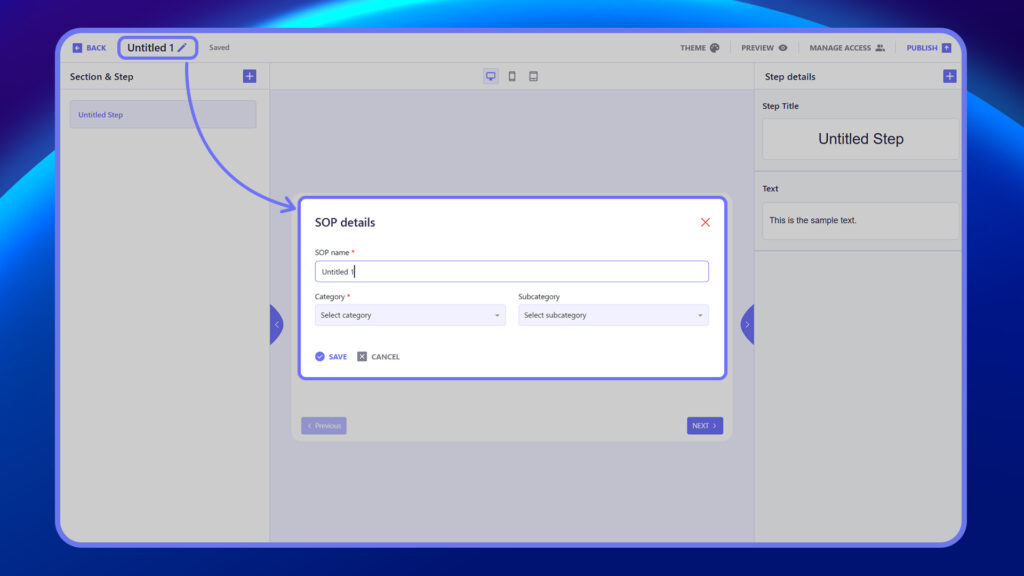
2. Select a Category from the dropdown to classify the SOP.
3. (Optional) Choose a Subcategory for more specific classification.
4. Rename default titles like “Untitled 1” to a clear, meaningful name.
5. Click Save to proceed.


